If you want to start playing games and earning rewards on DK999, the very first thing you need to do is DK999 register. Creating your account is quick, simple, and completely free. This full guide will walk you through every single step of the DK999 sign up process, explain every field on the register screen, and help you avoid any common mistakes. Whether you are doing the DK999 app register for the first time or helping a friend get started, this article has everything you need.
What Is DK999 and Why Should You Register?
DK999 is one of the most popular online mini-game platforms for users in Pakistan. It offers a wide variety of games including arcade games, card games, spin games, puzzle games, and more. The platform is designed to be simple and easy to use, even for people who have never played online games before.
When you complete the DK999 register process, you get access to your own personal account. From there you can play all the available games, claim daily rewards, deposit and withdraw money through JazzCash and Easypaisa, and enjoy many other features. Without an account, you cannot access any of these benefits. That is why the DK999 sign up is the most important first step for every new user.
DK999 Register Screen – What You Will See
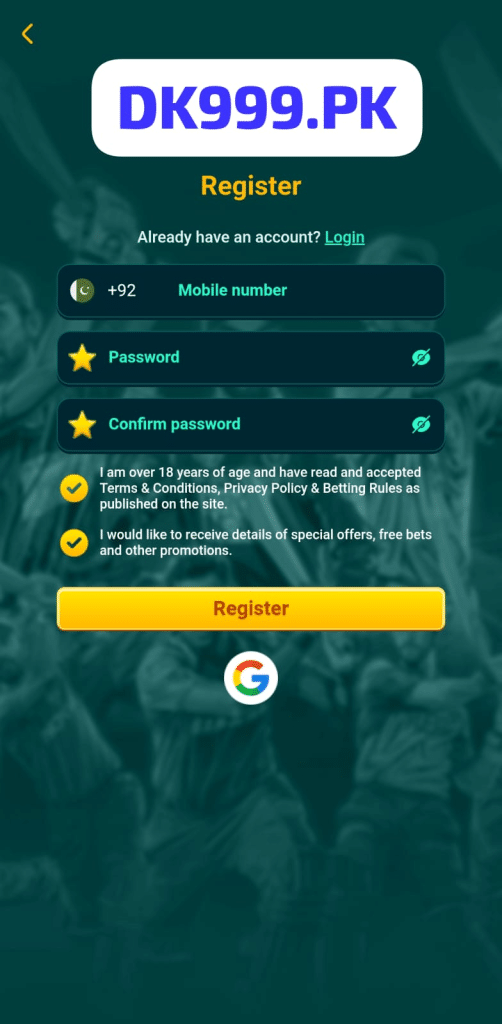
When you open the DK999 app and go to the register page, you will see a clean and simple screen. At the very top is the DK999.PK logo displayed inside a white box. Below the logo, the word “Register” is written in bold yellow text. Just below that, you will see the line “Already have an account?” followed by a green “Login” link. If you already have an account, you can tap that link to go back to the login page.
The main registration form has three input fields, two checkboxes, a large yellow Register button, and a Google icon at the bottom. Everything on the screen is easy to understand. Let us go through each part one by one.
DK999 Register – Step by Step Guide
The DK999 APK register process takes less than two minutes. Follow these simple steps carefully and your account will be ready in no time.
Step 1 – Open the DK999 App
First, open the DK999 app on your Android phone. If you have not downloaded it yet, visit the official DK999.PK website and download the APK file. Once the app is installed, tap the icon to open it. On the main screen, look for the Register option and tap it to go to the DK999 register screen.
Step 2 – Enter Your Mobile Number
The first field on the DK999 app register screen is for your mobile number. You will notice a Pakistan flag icon on the left side of the field along with the country code +92 already filled in. This means the platform is set up specifically for Pakistani users.
Tap on the field and enter your Pakistani mobile number. You do not need to add the country code yourself as it is already there. Just type your number starting from the digits after +92. For example, if your number is 0312-1234567, simply type 3121234567 in the field. Make sure the number you enter is active and accessible because it will be used for account verification and future login.
Step 3 – Create Your Password
The second field on the DK999 game register screen is for your password. A yellow star icon is on the left side of the field and the word “Password” is shown as placeholder text. Tap on this field and create a strong password for your account.
Your password should be between 6 and 12 characters and must only contain letters or numbers. Do not use any special characters like @, #, !, or % as these are not accepted. On the right side of the password field, there is an eye icon. Tap it to see what you are typing. Tap it again to hide it. This helps you make sure you are entering the right password without any mistakes.
Step 4 – Confirm Your Password
The third field is the “Confirm password” field. It also has a yellow star icon on the left and an eye icon on the right. Tap this field and type your password again exactly as you entered it in the previous field. This step makes sure you did not make any typing mistakes when creating your password. Both passwords must match exactly before you can proceed.
If the two passwords do not match, the system will show an error and you will need to try again. Take your time and type carefully.
Step 5 – Accept the Terms and Conditions
Below the three input fields, you will see two checkboxes. Both are already checked with a yellow checkmark icon, but it is important that you read and understand what they say before tapping the Register button.
The first checkbox says: “I am over 18 years of age and have read and accepted Terms and Conditions, Privacy Policy and Betting Rules as published on the site.”
This is very important. By checking this box, you are confirming that you are 18 years old or above and that you agree to all the rules and policies of the DK999 platform. You must be at least 18 years old to use DK999. If you are under 18, you are not allowed to register.
The second checkbox says: “I would like to receive details of special offers, free bets and other promotions.”
This is optional. If you check this box, DK999 will send you information about special offers, bonuses, free bets, and promotions. This is a good option to keep checked because it means you will always know about the latest deals and rewards available on the platform.
Step 6 – Tap the Register Button
Once you have filled in all three fields and checked the boxes, tap the large yellow “Register” button at the bottom of the screen. The button is easy to see and hard to miss. After you tap it, the app will process your details and create your account. In just a few seconds, your DK999 account will be ready and you can start exploring the platform.
Step 7 – Register Using Google
If you do not want to fill in the form manually, DK999 also gives you the option to register using your Google account. At the bottom of the DK999 sign up screen, below the Register button, you will see the Google icon. Tap it and select your Google account to register instantly. This is the fastest way to create a DK999 account and takes only one tap.
DK999 Sign Up – Important Things to Remember
Before you complete the DK999 register process, keep these important points in mind:
- Use an active Pakistani mobile number – Your +92 number must be real and active. It will be used for account verification, deposits, withdrawals, and future login.
- Remember your password – Write it down somewhere safe. Your password must be 6 to 12 characters with no special characters. If you forget it, you will need to reset it through the login screen.
- You must be 18 or older – DK999 is only for adults. The first checkbox on the register screen confirms your age. Do not register if you are under 18.
- Each mobile number can only be used once – You can only create one account per mobile number. Do not try to register the same number twice.
- Keep your details safe – Never share your mobile number and password with anyone else after registering.
Common DK999 Register Problems and How to Fix Them
Sometimes users face small issues when trying to complete the DK999 APK register. Here are the most common problems and their easy solutions:
Problem 1 – Mobile Number Already Registered
If you enter your mobile number and get an error saying it is already registered, it means an account already exists with that number. In this case, go back to the login screen and log in with your existing account. If you forgot your password, use the Forgot Password option on the login page.
Problem 2 – Passwords Do Not Match
If the system says your passwords do not match, go back to the password field and the confirm password field and type them both again carefully. Make sure there are no extra spaces and that both fields have exactly the same characters.
Problem 3 – Invalid Mobile Number Format
If you get an error about your mobile number, make sure you are entering it in the correct format. The +92 country code is already there, so just type the remaining digits of your Pakistani mobile number without any dashes or spaces.
Problem 4 – App Not Responding After Tapping Register
If the app freezes or does not respond after you tap the Register button, check your internet connection. The DK999 app register process needs a working internet connection to send your details to the server. Try switching between Wi-Fi and mobile data and then tap Register again.
Problem 5 – Special Characters Not Accepted in Password
Remember that DK999 passwords cannot contain special characters. If you tried to use symbols in your password, clear the field and enter a new password using only letters and numbers. This is one of the most common reasons the DK999 game register fails for new users.
Problem 6 – Google Sign Up Not Working
If the Google registration option is not working, make sure you have a Google account set up on your phone and that your internet connection is stable. Close the app, reopen it, and try again. If the problem continues, use the manual registration form instead.
Benefits You Get After DK999 Register
Once your DK999 sign up is complete and your account is ready, a whole range of features and benefits become available to you. Here is what you can enjoy after registering:
Welcome Bonus
New users receive a welcome bonus on their first login after registration. This gives you extra balance to explore games without spending your own money right away.
Daily Login Rewards
Every time you log in after completing the DK999 register, you can claim a daily reward. For the first seven consecutive days after signing up, your bonus increases with each login. Logging in every day is a great way to grow your balance quickly.
Full Access to All Games
After your DK999 app register is done, you get complete access to all mini-games on the platform. Play arcade games, card games, spin games, puzzle games, and more whenever you want.
JazzCash and Easypaisa Payments
Your registered account lets you deposit and withdraw money easily using JazzCash or Easypaisa. These are the most widely used payment methods in Pakistan, making transactions smooth and hassle-free for every user.
Referral Bonus
After registering, you get your own personal referral link inside your account. Share it with friends and family. Every time someone registers using your link, you earn a referral bonus directly in your wallet.
VIP Levels
As you continue to use the platform after your DK999 sign up, you gradually earn VIP status. Higher VIP levels unlock better rewards, faster withdrawals, and access to exclusive bonuses.
Special Offers and Promotions
If you checked the second checkbox during registration, you will receive notifications about special offers, free bets, and seasonal promotions. These events are a great way to earn extra rewards without extra effort.
How to Download DK999 APK to Register
If you have not downloaded the DK999 app yet, follow these simple steps to get it on your Android phone:
- Open the browser on your Android phone
- Go to the official website at DK999.PK
- Find and tap the download button to get the APK file
- Go to your phone Settings and allow installation from unknown sources
- Tap the downloaded APK file to install it
- Open the app and go to the DK999 register screen to create your account
The app file is only 21 MB so it downloads very quickly even on slower mobile data. It runs smoothly on low-end Android phones and does not require a very fast internet connection to work properly.
DK999 Register on iOS Devices
At this time, the DK999 app is mainly available for Android devices. If you are using an iPhone or iPad, you can try visiting DK999.PK through the Safari browser to access the registration page. For the smoothest DK999 sign up experience, using an Android phone is recommended. Visit the official website for the latest updates on iOS availability.
DK999 Customer Support for Register Issues
If you have followed all the steps and are still having trouble completing the DK999 APK register, the support team is ready to help you. You can reach them through:
- WhatsApp – Send a message for fast and direct support
- Official Facebook Page – Message the DK999 Facebook page for help and guidance
- In-App Help Section – Open the Support or Help section inside the DK999 app
When contacting support, mention the mobile number you are trying to register with and explain your issue clearly. The team responds quickly and will help you get your account created without any further problems.
Frequently Asked Questions About DK999 Register
Final Words
The DK999 register process is one of the simplest and fastest ways to create a gaming account in Pakistan. The register screen is clean, the fields are easy to understand, and the whole process takes less than two minutes. Just enter your Pakistani mobile number with the +92 code, create a password, confirm it, accept the terms, and tap the yellow Register button. Your account is ready instantly.
Whether you are doing the DK999 game register, the DK999 app register, or the DK999 APK register, the steps are always the same and always straightforward. You can also skip the form entirely and use the Google sign-up option for the fastest possible registration experience.
Once your DK999 sign up is complete, a world of games, daily rewards, bonuses, and easy payments through JazzCash and Easypaisa is waiting for you. Get started today and enjoy everything DK999 has to offer.