If you have been playing games on DK999 and have earned rewards and balance in your account, the next step is to withdraw your money. The DK999 withdrawal process is straightforward, secure, and designed specifically for users in Pakistan. This complete guide will explain every part of the withdrawal screen, walk you through the step by step process, and help you understand important things like turnover requirements and withdrawal limits. Whether you are withdrawing for the first time or looking to understand the process better, this article covers everything you need to know.
Why Is the DK999 Withdrawal System Important?
The ability to withdraw your earnings is one of the most important features of any gaming platform. DK999 makes this process easy by supporting trusted Pakistani payment services like Easypaisa and JazzCash. Once you have earned enough balance through gameplay, you can transfer your money directly to your mobile wallet and use it however you like.
The DK999 withdrawal system is available around the clock and gives users up to 99 withdrawal transactions per day, making it one of the most flexible withdrawal systems available on any gaming platform in Pakistan.
DK999 Withdrawal Screen – What You Will See
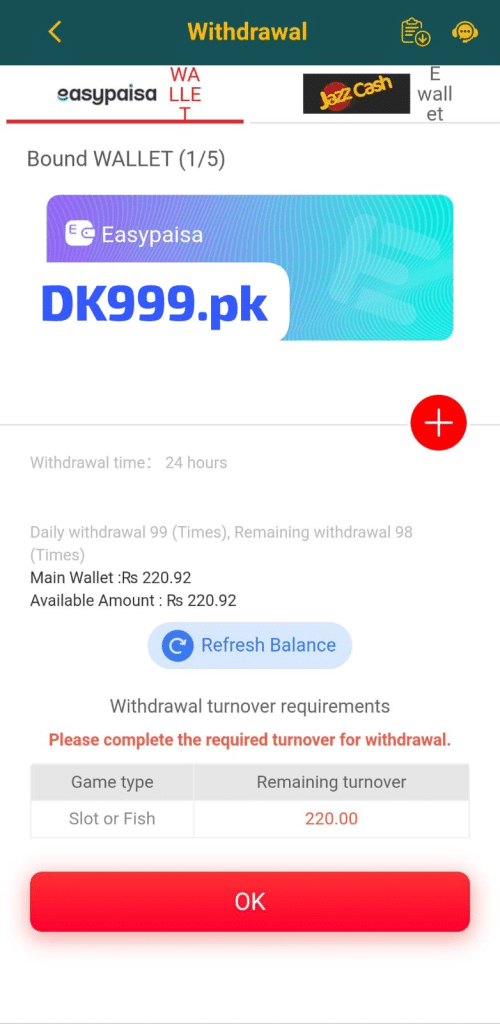
When you open the withdrawal page inside the DK999 app, you will see a clean and informative screen. The page title “Withdrawal” is written in yellow text on a dark green header at the top. On the top right corner, you will find two icons — one for withdrawal history and one for the customer support chat. If you face any issue during the withdrawal process, tap the support icon to get help instantly.
The withdrawal screen is organized into several clear sections. Let us go through each one in full detail.
Withdrawal Method Tabs
At the top of the DK999 withdrawal screen, just below the header, you will see three tabs for choosing your withdrawal method:
Easypaisa Wallet Tab
The first tab shows the Easypaisa logo along with the word “WALLET.” This tab is currently selected, shown by the red underline beneath it. Easypaisa is one of the most widely used mobile payment services in Pakistan and is a popular choice for withdrawals on DK999.
JazzCash Tab
The second tab shows the JazzCash logo. If you prefer to withdraw your earnings directly to your JazzCash account, tap this tab to switch to the JazzCash withdrawal option. JazzCash is equally trusted and widely used across Pakistan.
E-Wallet Tab
The third tab is labeled “E Wallet.” This option may support additional electronic wallet methods. Tap this tab to explore other available withdrawal options if neither Easypaisa nor JazzCash suits your needs.
Simply tap the tab that matches your preferred payment method before proceeding with your withdrawal.
Bound Wallet Section
Just below the tabs, you will see the text “Bound WALLET (1/5).” This means you currently have one withdrawal account linked to your DK999 profile, and you can link up to a maximum of five different accounts. Having multiple linked accounts gives you flexibility to withdraw to different payment methods whenever you need.
Your Linked Easypaisa Account
Below the Bound WALLET label, you will see a card displaying your linked Easypaisa account. The card has a purple and teal gradient design with the Easypaisa logo and DK999.pk branding on it. This card represents the wallet account that your withdrawal money will be sent to.
The + Red Button
On the right side of the screen, there is a red circular button with a plus (+) sign. Tap this button if you want to add a new withdrawal account. You can link additional JazzCash or Easypaisa accounts up to the maximum limit of five. This is useful if you want to withdraw to a different mobile number or switch between payment methods.
Withdrawal Time
Below the wallet card section, you will see an important piece of information:
Withdrawal time: 24 hours
This means DK999 processes withdrawal requests within 24 hours. In most cases, withdrawals are completed much faster, often within a few minutes to a few hours. However, the platform guarantees processing within a maximum of 24 hours. The withdrawal service is available at all times, so you can submit a withdrawal request at any hour of the day or night.
Daily Withdrawal Limit and Remaining Withdrawals
Below the withdrawal time, you will see the following information:
Daily withdrawal 99 (Times), Remaining withdrawal 98 (Times)
This means DK999 allows you to make up to 99 withdrawal transactions per day. This is a very generous limit that gives you full flexibility to withdraw as often as you need throughout the day. The remaining count shown is 98, which means one withdrawal has already been made for the day and 98 more are still available.
This high daily limit means you will almost never hit the cap during normal usage. Most users complete their withdrawals within just one or two transactions per day.
Main Wallet and Available Amount
The next section shows your current wallet balance in two lines:
Main Wallet: Rs 220.92 Available Amount: Rs 220.92
The Main Wallet shows your total balance inside your DK999 account. The Available Amount shows how much of that balance you are currently eligible to withdraw. In this case both amounts are the same at Rs 220.92, meaning the full wallet balance is available for withdrawal.
However, this available amount is subject to the turnover requirements explained further below. Always check the turnover requirements section before attempting a withdrawal to make sure your balance is eligible.
Refresh Balance Button
Just below the balance information, there is a “Refresh Balance” button with a circular refresh icon. Tap this button to update your balance in real time. This is useful if you have just completed a game or received a bonus and want to see your latest balance before withdrawing.
Withdrawal Turnover Requirements
This is one of the most important sections on the DK999 withdrawal screen and it is important to understand it clearly before you try to withdraw.
At the top of this section, you will see the heading “Withdrawal turnover requirements” followed by a red warning message:
“Please complete the required turnover for withdrawal.”
This message means that before you can withdraw your balance, you must first meet a minimum gameplay turnover requirement. This is a standard practice on gaming platforms and is designed to ensure that deposited funds are used for gameplay before being withdrawn.
What Is a Turnover Requirement?
A turnover requirement means you need to place bets or play games worth a certain total amount before your balance becomes eligible for withdrawal. For example, if your turnover requirement is Rs 220.00, you need to play games totaling Rs 220.00 in bets before you can withdraw.
Turnover Table on the Screen
Below the warning message, there is a table with two columns:
| Game Type | Remaining Turnover |
|---|---|
| Slot or Fish | 220.00 |
This table shows that for the current balance, the remaining turnover requirement is Rs 220.00 specifically for Slot or Fish games. This means you need to play Slot or Fish games and place bets totaling Rs 220.00 before your balance will be released for withdrawal.
Once you complete the required turnover, the red warning will disappear and your balance will become fully available for withdrawal. The turnover requirement is directly linked to the amount you deposited, so the more you play, the faster you clear the requirement.
The OK Button
At the very bottom of the withdrawal screen, there is a large red “OK” button. Once you have reviewed all the information on the screen — your linked account, your available balance, and your turnover status — tap the OK button to proceed with your withdrawal request. If the turnover requirement has not been met, you will need to complete the required gameplay first before the withdrawal can be processed.
DK999 Withdrawal – Step by Step Guide
Here is a complete and easy to follow step by step guide for completing your DK999 withdrawal:
Step 1 – Open the Withdrawal Page
Log in to your DK999 account and go to the Wallet section. Tap on the Withdrawal option to open the DK999 withdrawal screen.
Step 2 – Choose Your Withdrawal Method
At the top of the screen, tap on the tab for your preferred withdrawal method — Easypaisa Wallet, JazzCash, or E-Wallet. Make sure the tab you select matches the payment service you want to receive your money on.
Step 3 – Check Your Linked Account
Look at the Bound WALLET section to confirm that your correct payment account is linked. If you want to withdraw to a different account, tap the red + button to add a new account. You can link up to five accounts in total.
Step 4 – Check Your Available Balance
Look at the Main Wallet and Available Amount section to see how much money you have available for withdrawal. Tap the Refresh Balance button to make sure you are seeing the most up to date balance.
Step 5 – Check the Turnover Requirements
Before proceeding, always check the Withdrawal Turnover Requirements section. If the red warning message is showing and the turnover table shows a remaining amount, you must first play Slot or Fish games to complete the required turnover. Once the remaining turnover reaches zero, your balance will be fully available for withdrawal.
Step 6 – Tap OK to Proceed
Once your turnover requirement is completed and your balance is available, tap the red OK button at the bottom of the screen. Follow the next steps shown by the app to confirm your withdrawal request and send the money to your linked Easypaisa or JazzCash account.
Step 7 – Wait for Processing
After submitting your withdrawal request, wait for the amount to arrive in your mobile wallet. Most withdrawals are processed quickly, but the platform guarantees delivery within 24 hours. You can check your withdrawal history using the history icon at the top right of the screen.
How to Add a New Withdrawal Account on DK999
If you want to link a new Easypaisa or JazzCash account for withdrawal, follow these steps:
- Open the Withdrawal page in the DK999 app
- Tap the red + button on the right side of the screen
- Select the type of account you want to add — Easypaisa or JazzCash
- Enter the mobile number linked to your payment account
- Confirm the details and save
You can add up to five different accounts. Having multiple accounts linked gives you the option to withdraw to different numbers whenever needed. Always make sure the mobile number you link is active and registered with the payment service you select.
Understanding DK999 Withdrawal Turnover – Simple Explanation
The turnover requirement can be confusing for new users, so here is a very simple explanation:
When you deposit money on DK999, the platform requires you to use that money for gameplay before you can withdraw it. This is called a turnover or wagering requirement. The remaining turnover shown in the table tells you exactly how much more you need to play before your money is free to withdraw.
For example:
- You deposit Rs 220
- Your turnover requirement is Rs 220
- You need to play Slot or Fish games worth Rs 220 in total bets
- Once done, your balance becomes fully available for withdrawal
The good news is that every bet you place in the required game type counts toward clearing the turnover. The more you play, the faster you clear it. Once it reaches zero, you can withdraw anytime.
DK999 Withdrawal Tips for a Smooth Experience
- Always check the turnover requirements first before trying to withdraw. If the requirement is not met, your withdrawal will not go through.
- Make sure your linked account is correct before tapping OK. Withdrawals sent to the wrong number cannot be easily reversed.
- Use the Refresh Balance button to always see your latest balance before submitting a withdrawal.
- Keep your linked payment accounts active — make sure your JazzCash or Easypaisa number is active and registered to receive incoming transfers.
- Contact support immediately if your withdrawal does not arrive within 24 hours. Use the support icon at the top right of the withdrawal page.
- Keep withdrawal history records — take a screenshot of your withdrawal confirmation for reference if needed.
Common DK999 Withdrawal Problems and Solutions
Problem 1 – Withdrawal Not Processed After 24 Hours
If your withdrawal has not arrived after 24 hours, contact the DK999 support team immediately through the chat icon on the withdrawal page. Share your withdrawal details and they will investigate and resolve the issue quickly.
Problem 2 – Turnover Requirement Not Completed
If the red warning message is showing, you cannot withdraw yet. Play Slot or Fish games to clear the remaining turnover shown in the table. Once the remaining amount reaches zero, you can proceed with your withdrawal.
Problem 3 – Wrong Account Linked
If your money was sent to the wrong linked account, contact support right away. Always double check your linked account details before submitting a withdrawal request to avoid this issue.
Problem 4 – Available Amount Shows Zero
If your available amount shows zero even though you have balance in your main wallet, it usually means your full balance is still subject to turnover requirements. Play the required games to unlock your balance for withdrawal.
Problem 5 – Cannot Add a New Withdrawal Account
If you are having trouble adding a new account using the + button, make sure you have not already linked five accounts. The maximum limit is five linked accounts. If you have reached the limit, you will need to remove an existing account before adding a new one.
Frequently Asked Questions About DK999 Withdrawal
Final Words
The DK999 withdrawal system is built to give Pakistani users a fast, flexible, and reliable way to access their earnings. With support for Easypaisa and JazzCash, up to 99 daily withdrawals, a 24-hour processing guarantee, and the ability to link up to five accounts, DK999 makes sure you always have easy access to your money.
The most important thing to understand before withdrawing is the turnover requirement. Make sure you have completed the required gameplay in Slot or Fish games before submitting your withdrawal. Once that is done, the process is simple — just tap OK and your money will be on its way to your linked payment account.
If you ever face any issues, the support team is just one tap away using the chat icon on the withdrawal page. Follow the steps in this guide, check your turnover status, and enjoy a smooth and hassle-free withdrawal experience on DK999 every time.