If you are looking for a simple and fast way to do DK999 login, you are in the right place. This complete guide will walk you through every step of the DK999 game login process, how to fix common login problems, and how to keep your account safe. Whether you are using the DK999 app login on your phone or accessing the platform through a browser, this article covers everything you need to know.
What Is DK999?
DK999 is a popular online mini-game platform made for users in Pakistan. It allows players to enjoy a wide variety of games including arcade games, card games, spin and lucky draw games, and more. The platform supports easy payments through JazzCash and Easypaisa, making deposits and withdrawals very simple for people all across Pakistan.
Before you can start playing any game or earning rewards, the first thing you need to do is complete the DK999 login. Your account is the gateway to all the features the platform offers. Once you are logged in, everything is just a tap away.
DK999 Login – Step by Step Guide
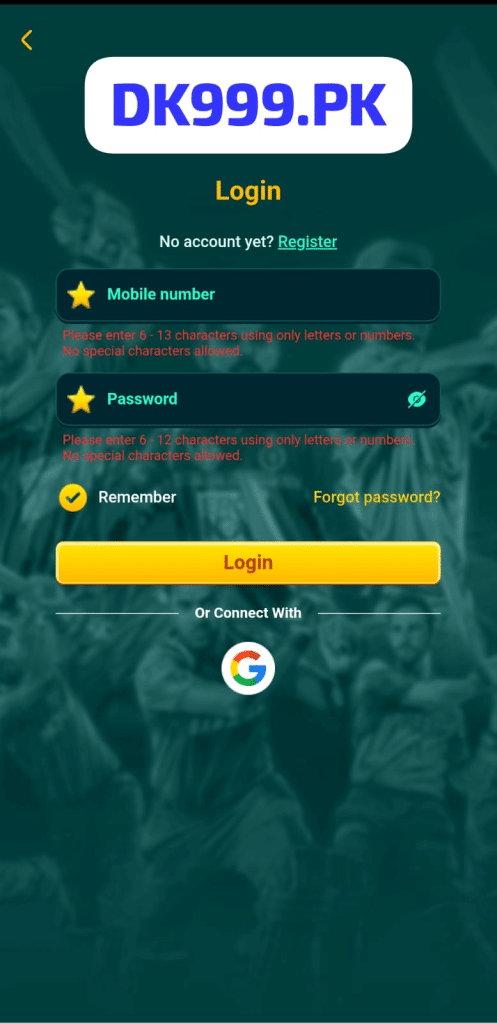
The DK999 APK login process is very easy. Even if you have never used a gaming app before, you can complete it in just a few seconds. Here is exactly what you need to do:
Step 1 – Open the DK999 App
First, open the DK999 app on your Android phone. Tap the app icon to launch it. The app will load quickly and take you directly to the DK999 login screen.
Step 2 – Look at the Login Screen
When the app opens, you will see the main DK999 login screen. At the top, the DK999.PK logo is clearly displayed inside a white box. Below the logo, you will see the word “Login” written in bold yellow text. This is the screen where you enter your account details to sign in.
Step 3 – Enter Your Mobile Number
The first input field on the DK999 app login screen asks for your mobile number. A yellow star icon appears on the left side of the field, and the placeholder text reads “Mobile number.” Tap on this field and type your registered mobile number carefully.
The system accepts 6 to 13 characters using only letters or numbers. No special characters are allowed, so make sure you do not include dashes, spaces, or symbols when typing your number.
Step 4 – Enter Your Password
Below the mobile number field, you will find the password field. It also has a yellow star icon on the left. Tap on it and enter your account password. Your DK999 password must be between 6 and 12 characters and should only use letters or numbers — no special characters allowed.
On the right side of the password field, there is an eye icon. Tap it if you want to see the characters you are typing. Tap it again to hide them. This is useful if you want to make sure you are entering your password correctly.
Step 5 – Use the Remember Option
On the DK999 login screen, just below the password field, there is a “Remember” checkbox on the left side with a checkmark icon. If you enable this option, the app will save your login details automatically. This means the next time you open the app, you will not need to type your mobile number and password again. This is very convenient for users who log in daily.
Only use the Remember option on your own personal phone. Avoid using it on a shared or public device to protect your account.
Step 6 – Forgot Password Option
On the right side, next to the Remember checkbox, you will see a “Forgot password?” link written in yellow. If you have forgotten your password, tap this link and follow the steps to reset it. You will need access to your registered mobile number to complete the password reset process.
Step 7 – Tap the Login Button
Once you have filled in your mobile number and password, tap the large yellow “Login” button at the bottom of the screen. The button is bright and easy to spot. If your details are correct, the app will log you in immediately and take you to your account dashboard where all your games and rewards are waiting.
DK999 Login via Google Account
One very helpful feature on the DK999 login screen is the ability to sign in using Google. Right below the main Login button, you will see a section that says “Or Connect With” with a Google icon displayed below it. If you prefer not to enter your mobile number and password every time, you can simply tap the Google icon and log in using your Google account in just one tap. This makes the DK999 sign in process even faster and more convenient.
Forgot Your DK999 Password?
If you have forgotten your password and cannot complete the DK999 app login, do not worry at all. On the login screen, tap the yellow “Forgot password?” link on the right side. You will be guided through a simple step-by-step process to reset your password.
Make sure you have access to the mobile number you used when creating your account. A verification code will be sent to that number. Once you verify it, you can set a new password and log in again without any problem.
Common DK999 Login Problems and How to Fix Them
Sometimes users face small issues when trying to complete the DK999 APK login. Here are the most common problems and their simple fixes:
Problem 1 – Wrong Mobile Number or Password
The most common reason login fails is typing the wrong mobile number or password. Go back and double-check your details carefully. Make sure there are no extra spaces before or after your number. Also remember that passwords on DK999 do not allow special characters, so if you accidentally added one, that could be why the login is failing.
Problem 2 – App Not Loading or Running Slowly
If the DK999 app is not opening or is loading very slowly, the issue is likely your internet connection. The app needs a steady connection to work well. Try switching from Wi-Fi to mobile data or the other way around. You can also fully close the app and reopen it to refresh the connection.
Problem 3 – Using an Old Version of the App
If the DK999 game login keeps failing even with the correct details, your app version may be outdated. Visit the official DK999.PK website and download the latest version of the APK. Updating the app usually solves most technical login issues very quickly.
Problem 4 – Account Temporarily Locked
If you enter the wrong password several times in a row, your account may get temporarily locked as a security measure. If this happens, wait a few minutes before trying again. If you are still unable to log in, contact the DK999 support team directly through WhatsApp or their official Facebook page for help.
Problem 5 – Special Characters in Password
The DK999 login screen clearly states that passwords must not contain special characters. If you are trying to log in with a password that includes symbols like @, #, !, or %, the system will reject it. Use only letters and numbers in your password to avoid this issue.
Problem 6 – Phone Cache Issue
Sometimes old cache data stored on your phone can cause the DK999 app login to behave unexpectedly. Go to your phone settings, find the DK999 app, and clear its cache. Then open the app again and try logging in. This simple step fixes many hidden technical issues.
Tips for a Safe and Smooth DK999 Sign In
Your account security is very important. Here are some easy tips to keep your DK999 sign in safe and trouble-free every time:
- Use a unique password – Create a password that you do not use on any other app or website. Mix letters and numbers to make it harder to guess.
- Enable Remember only on your own phone – Never save your login details on a phone that other people also use.
- Never share your password with anyone – The DK999 support team will never ask you for your password. If anyone asks for it, do not share it.
- Always log out on shared devices – If you ever use a friend’s or family member’s phone to log in, make sure you log out before handing the phone back.
- Keep the app updated – Always use the latest version of the DK999 APK. Updates often include security improvements that protect your account.
- Use the Google login option for speed – If you have a Google account, using the Google sign-in option on the DK999 login screen is faster and adds an extra layer of security.
DK999 App Login – What You Can Access After Signing In
Once you have successfully completed the DK999 login, your full account dashboard opens up. Here is everything you can enjoy:
All Games Unlocked
After DK999 game login, you get full access to every mini-game on the platform. This includes arcade games, card games, puzzle games, spin games, and more. All games are simple to understand and fun to play.
Daily Login Rewards
Every time you complete the DK999 sign in, you can collect your daily reward. These small bonuses add up over time and give you more balance to play with. The more consistently you log in, the more you earn.
Wallet and Transactions
Your wallet is visible right inside your account after login. You can deposit money using JazzCash or Easypaisa and withdraw your earnings just as easily. Transactions are fast and processed within minutes.
Referral Bonuses
Inside your logged-in account, you will find your personal referral link. Share it with friends. When they join using your link, you earn a referral bonus added directly to your wallet.
VIP Status and Rewards
Regular login and gameplay helps you climb the VIP levels. Higher VIP status comes with extra perks like faster withdrawals, bigger bonuses, and priority customer support.
How to Download DK999 APK Before Login
If you have not yet downloaded the app, here are the steps to get it on your Android phone:
- Open your phone’s browser
- Visit the official website at DK999.PK
- Tap the download button to get the APK file
- Go to Settings on your phone and allow installation from unknown sources
- Open the downloaded file and install it
- Launch the app and complete the DK999 APK login
The app is only 21 MB so it installs quickly. It runs smoothly even on older Android phones with limited RAM and works fine on slow but stable internet connections.
DK999 Login on iOS Devices
The DK999 app is currently built mainly for Android. If you are using an iPhone or iPad, you can try accessing the platform through the Safari browser by going to DK999.PK directly. For the best experience, an Android device is recommended. Check the official website regularly for any iOS updates.
DK999 Customer Support for Login Help
If you have followed all the steps and still cannot complete the DK999 game login, the support team is available to assist you. Contact them through any of these channels:
- WhatsApp – Send a message and get a quick reply from the support team
- Official Facebook Page – Message the DK999 page directly for guidance
- In-App Help Section – Open the Support or Help section inside the app itself
When reaching out, always mention the mobile number linked to your account and explain your issue clearly. The team responds quickly and will help you get back into your account as soon as possible.
Frequently Asked Questions About DK999 Login
Final Words
The DK999 login process is one of the easiest and most user-friendly in the online gaming space in Pakistan. The login screen is clean, simple, and easy to understand. Just enter your mobile number, type your password, and tap the yellow Login button. In a few seconds, you are inside your account and ready to enjoy all the games and rewards DK999 has to offer.
Whether you are completing the DK999 app login, the DK999 APK login, or the DK999 game login for the very first time or the hundredth time, the experience is always the same — fast, simple, and smooth. With support for Google sign-in, a Remember option, and a Forgot Password link right on the screen, DK999 makes sure every user can access their account without any stress.
If you ever face any issue with the DK999 sign in, use the tips in this guide to fix it quickly. And remember, the support team is always just a message away.