If you want to play games and earn real rewards on DK999, the first thing you need after registering is to add money to your account. The DK999 deposit process is very simple, fast, and secure. This complete guide will walk you through every step of the DK999 deposit process, explain every section on the deposit screen, and help you understand all the payment options available. Whether you are making your first deposit or your tenth, this article will make it easy for you.
Why Do You Need to Deposit on DK999?
DK999 is a real money gaming platform. Once you have registered and logged in, you need to add balance to your wallet before you can play most games. The deposit system on DK999 is built specifically for users in Pakistan, which is why it supports trusted local payment methods like JazzCash and Easypaisa. Depositing money is safe, quick, and the funds appear in your account almost instantly.
The minimum deposit amount is just Rs 100, which means you can start playing without spending a lot of money. The maximum deposit allowed is Rs 50,000, giving flexibility to both casual players and serious gamers.
DK999 Deposit Screen – What You Will See
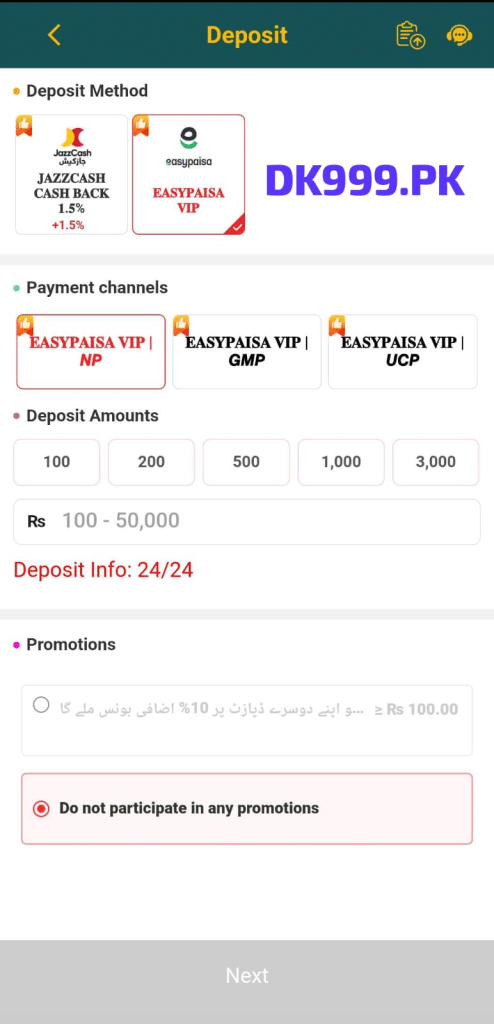
When you open the deposit page inside the DK999 app, you will see a clean and well-organized screen. The page title “Deposit” is written in yellow text on a dark green header at the top. On the top right corner, there are two icons — one for deposit history and one for customer support chat. If you ever need help during the deposit process, tap the support icon to get assistance instantly.
The deposit screen is divided into four main sections:
- Deposit Method
- Payment Channels
- Deposit Amounts
- Promotions
Let us go through each section in full detail.
Section 1 – Deposit Method
The first section on the DK999 deposit screen is called “Deposit Method.” This is where you choose how you want to add money to your account. There are two payment methods available:
JazzCash – JAZZCASH CASH BACK 1.5%
The first option is JazzCash. This is one of the most widely used mobile payment services in Pakistan. When you deposit using JazzCash on DK999, you receive a cash back of 1.5% on your deposit amount. This means if you deposit Rs 1,000, you get an extra Rs 15 back as a bonus. The +1.5% label is clearly shown on the JazzCash option card, making it easy to understand the benefit at a glance.
Easypaisa – EASYPAISA VIP
The second option is Easypaisa, labeled as EASYPAISA VIP on the deposit screen. Easypaisa is another very popular mobile payment service used all across Pakistan. The Easypaisa VIP option is shown with a checkmark when selected, indicating it is currently active. This method gives you access to VIP payment channels which offer fast and reliable processing.
Both JazzCash and Easypaisa are trusted, locally recognized payment services. You can use whichever one you have active on your phone. Simply tap the card for your preferred method to select it.
Section 2 – Payment Channels
After selecting your deposit method, the next section shows the available Payment Channels. If you select Easypaisa VIP as your deposit method, you will see three channel options:
EASYPAISA VIP | NP
This is the first payment channel option and is selected by default, shown with a red border. NP stands for a specific payment network route. This is the most commonly used channel and works well for most users.
EASYPAISA VIP | GMP
The second channel option is GMP. This is another available payment route through Easypaisa VIP. If the NP channel is busy or slow, you can try the GMP channel as an alternative.
EASYPAISA VIP | UCP
The third channel option is UCP. This is the third available route for Easypaisa VIP deposits. Having three different channels means that even during busy times, you will always have a working option available for your DK999 deposit.
Simply tap on the channel you want to use. If one channel does not work, try another. All three channels process your deposit quickly and securely.
Section 3 – Deposit Amounts
The third section of the DK999 deposit screen is the Deposit Amounts section. This is where you choose how much money you want to add to your account. There are two ways to select your deposit amount:
Quick Select Buttons
DK999 provides five preset amount buttons for quick and easy selection:
- Rs 100
- Rs 200
- Rs 500
- Rs 1,000
- Rs 3,000
Simply tap on any of these buttons and the amount will be automatically filled in. These preset options save time and are perfect for users who regularly deposit the same amount.
Manual Amount Input
If you want to deposit a specific amount that is not listed in the preset buttons, you can type it manually in the input field below. The field shows “Rs 100 – 50,000” which tells you the allowed deposit range. The minimum amount you can deposit is Rs 100 and the maximum is Rs 50,000 in a single transaction.
This flexible system means whether you want to deposit a small amount like Rs 150 or a large amount like Rs 25,000, the DK999 deposit system can handle it easily.
Deposit Info: 24/24
Just below the deposit amount section, you will see the text “Deposit Info: 24/24” written in red. This means the DK999 deposit service is available 24 hours a day, 7 days a week. You can add money to your account at any time — morning, afternoon, evening, or midnight. There are no restrictions on when you can deposit.
Section 4 – Promotions
The last section on the DK999 deposit screen is the Promotions section. This gives you the option to participate in a bonus offer when making your deposit.
10% Extra Bonus on Second Deposit
The first promotion option says: “Rs 100.00 se apni doosri deposit par 10% izafi bonus miley ga” — which means you will receive a 10% extra bonus on your second deposit of Rs 100 or more. For example, if your second deposit is Rs 1,000, you will receive an extra Rs 100 as a bonus added to your account. This is a great way to get more value from your deposit.
To take advantage of this offer, simply select this option by tapping the radio button next to it before proceeding.
Do Not Participate in Any Promotions
The second option is “Do not participate in any promotions.” This option is selected by default on the screen. If you do not want to join any bonus offer with your current deposit, keep this option selected and your deposit will be processed as a standard transaction without any bonus conditions attached.
Choose the option that suits you best before tapping Next.
DK999 Deposit – Step by Step Guide
Now that you understand every section of the deposit screen, here is a complete step by step guide to make your DK999 deposit successfully:
Step 1 – Open the Deposit Page
Log in to your DK999 account and go to the Wallet section. Tap on the Deposit option to open the DK999 deposit screen.
Step 2 – Select Your Deposit Method
In the Deposit Method section, tap either JazzCash or Easypaisa VIP depending on which mobile payment service you use. Remember that JazzCash gives you 1.5% cash back on your deposit.
Step 3 – Choose a Payment Channel
If you selected Easypaisa VIP, choose one of the three available payment channels — NP, GMP, or UCP. The NP channel is selected by default and works for most users.
Step 4 – Enter Your Deposit Amount
Either tap one of the five quick select buttons (100, 200, 500, 1,000, or 3,000) or manually type your desired amount in the input field. Remember the range is Rs 100 to Rs 50,000.
Step 5 – Select a Promotion (Optional)
In the Promotions section, decide if you want to participate in the 10% bonus offer on your second deposit. If yes, tap that option. If not, leave the default “Do not participate” option selected.
Step 6 – Tap the Next Button
Once everything is filled in and selected, tap the large “Next” button at the bottom of the screen. The app will guide you through the final steps to complete your payment through JazzCash or Easypaisa.
Step 7 – Complete the Payment
Follow the on-screen instructions to complete the payment through your chosen method. Once the payment is confirmed, your balance will be updated in your DK999 wallet almost instantly.
DK999 Deposit Tips for a Smooth Experience
Here are some helpful tips to make sure your DK999 deposit goes smoothly every time:
- Make sure your JazzCash or Easypaisa account has enough balance before starting the deposit process.
- Use a stable internet connection during the deposit. A weak connection can cause the transaction to fail or get stuck.
- Start with a small amount if it is your first time depositing. This helps you understand the process before making a larger deposit.
- Take advantage of the JazzCash 1.5% cash back — it adds up over time and gives you extra value on every deposit.
- Check the promotions section each time you deposit. DK999 regularly updates its bonus offers and you do not want to miss out on extra balance.
- Keep a screenshot of your payment confirmation after each deposit in case you ever need to contact support.
- Contact support if your balance does not update within a few minutes of completing the payment. The support icon is right there on the deposit page for quick access.
Common DK999 Deposit Problems and Solutions
Problem 1 – Balance Not Updated After Payment
If you completed the payment but your DK999 wallet balance did not update, wait a few minutes. Sometimes there is a short delay. If the balance still does not update after 5 to 10 minutes, tap the support icon on the deposit page and contact the team with your payment screenshot.
Problem 2 – Payment Failed or Transaction Error
If your JazzCash or Easypaisa payment failed, check that your mobile wallet has sufficient balance. Also make sure your internet connection was stable during the transaction. Try again using a different payment channel if the problem continues.
Problem 3 – Wrong Amount Entered
If you entered the wrong amount before tapping Next, go back and correct it before completing the payment. Once a payment is processed, it cannot be reversed easily, so always double-check the amount before confirming.
Problem 4 – Channel Not Working
If one Easypaisa VIP channel is not processing your deposit, try switching to another channel. All three channels — NP, GMP, and UCP — provide the same service and you can freely switch between them.
Problem 5 – Deposit Limit Exceeded
If you try to deposit more than Rs 50,000 in a single transaction, the system will not allow it. Split your deposit into two or more transactions if you need to add a larger amount.
Frequently Asked Questions About DK999 Deposit
Final Words
The DK999 deposit process is designed to be fast, simple, and convenient for every user in Pakistan. With support for JazzCash and Easypaisa, three different payment channels, a minimum deposit of just Rs 100, and 24/7 availability, adding money to your account has never been easier. The JazzCash 1.5% cash back and the 10% bonus on your second deposit make every transaction even more rewarding.
Whether you are depositing for the first time or adding more balance after a gaming session, the DK999 deposit screen gives you complete control over how much you add and which payment method you use. Follow the steps in this guide, choose your preferred method, select your amount, and tap Next. Your balance will be ready in moments and you can start playing right away.